Start writing here...
What is Data Management?
You probably heard it everywhere, data management in Grasshopper is absolutely crucial if you want to become a master in Grasshopper. Let's see what this is.
Starting with data
To operate on objects, Grasshopper has to define a certain data architecture. But what does "data" mean?
In the context of Grasshopper, data refers to a structured collection of values that represent geometrical, numerical, textual or logical information.
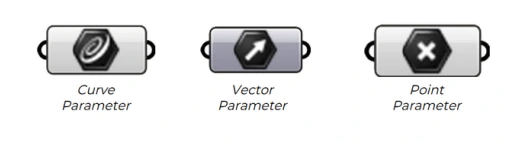
Following this, it makes sense that each data has a type. We call it a Data Type but this is most commonly known in Grasshopper as Parameters. More broadly in the computational world, we call those Types or Classes.
How about management?
In "data management" in Grasshopper, management refers to the systematic organization, control, transformation and propagation of structured data.
Basically, organizing your data in a certain way allows you to take advantage of the different behaviors each component can have.
The difference between a good Grasshopper definition and an excellent one lies within the data management.
Items & Indices
In Grasshopper, we also refer to data as "items". These items are defined by two things:
- An index/indice
- A value
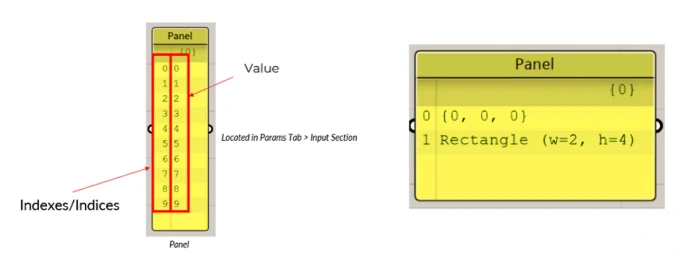
The index serves to identify and manipulate the item it belongs to.
Lists
A list is a fundamental feature of Grasshopper. This is a data container, so it logically contains data inside, i.e. items.
Non-restrictive behaviour
In many coding languages, a list often restricts the data stored to be of only one type. Meaning that you would have only Breps, only Points or just only Text. This prevent codes from crashing due to undesired data type.
Luckily for us, it is not the case in Grasshopper. This is the same as Python. We can store different types in the same list.
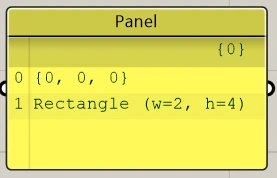
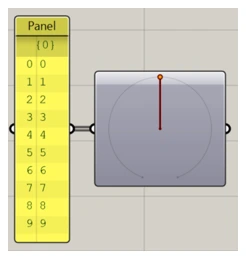
You can perform plenty of actions on a list. Splitting it, inserting new items, getting an item based on its index... But listing all those actions and diving deep into each of them is not the goal of this article.
Good practices with Lists
In many coding languages, a list often restricts the data stored to be of only one type. Meaning that you would have only Breps, only Points or just only Text. This prevent codes from crashing due to undesired data type.
Luckily for us, it is not the case in Grasshopper. This is the same as Python. We can store different types in the same list.
Data Trees
Our design features offer a range of tools to create visually stunning websites. Utilize WYSIWYG editors, drag-and-drop building blocks, and Bootstrap-based templates for effortless customization. With professional themes and an intuitive system, you can design with ease and precision, ensuring a polished, responsive result.
Building blocks system
Create pages from scratch by dragging and dropping customizable building blocks. This system simplifies web design, making it accessible to all skill levels. Combine headers, images, and text sections to build cohesive layouts quickly and efficiently.
Bootstrap-Based Templates
Design Odoo templates easily with clean HTML and Bootstrap CSS. These templates offer a responsive, mobile-first design, making them simple to customize and perfect for any web project, from corporate sites to personal blogs.